
STEP 5 - EDIT THE PHOTOS ON YOUR PARTY PAGE
Navigate to the parties and events page, you can do this via the “All Pages” page in the WordPress backend we were on earlier and then clicking “Edit With Divi” under “Parties and Events”
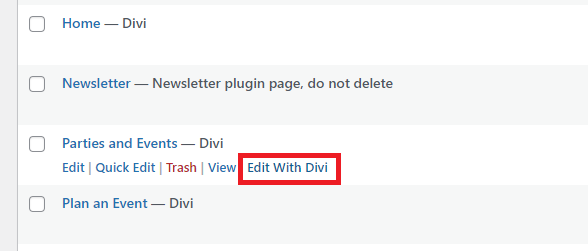
Now that you know how to edit photos, edit the three photos on the parties and events page to something more personal to your store. When choosing photos there are a few guidelines to follow:
For any photo, if you didn't take it yourself, make sure it has a free-use policy like stock photos. If you like an image from another BAM store site, make sure to ask permission before using it.
If using images of minifigs, make sure they are real LEGO minifigs and that you don't add any speech bubbles indicating that they are talking.
Avoid using clipart of any LEGO images including the LEGO brick shapes.
For using the LEGO logo follow the policy outlined in this document
Do not have a “mascot” minifig for your site. Meaning, do not have a particular minifig that pops up multiple times throughout your site in a way that viewers would begin to associate that figure with you or your store.
Make sure the images are high enough quality that they don't appear grainy on a computer screen and don't have watermarks
If you have questions about whether you can use a particular photo on your website, reach out to the @marketing_team in your PSC to get clarification.
If during the final approval process we ask you to change some images, don't feel bad. The marketing rules and regulations we have to follow are constantly changing, and we even need to change things from time to time.